

Integrate Microsoft Teams for a Feature-rich Phone System
Teams Phone System
Described as the “hub for teamwork”, Teams can also be your corporate phone system. Skyway delivers phone lines to Microsoft Teams and helps you migrate to Teams from your existing on-premises PBX.
How to Integrate Teams?
Microsoft Teams is a collaboration platform that integrates chat, video meetings, file storage, and application support. It serves as a corporate phone system, and Skyway enables you to connect phone lines to Teams and transition from your existing PBX.
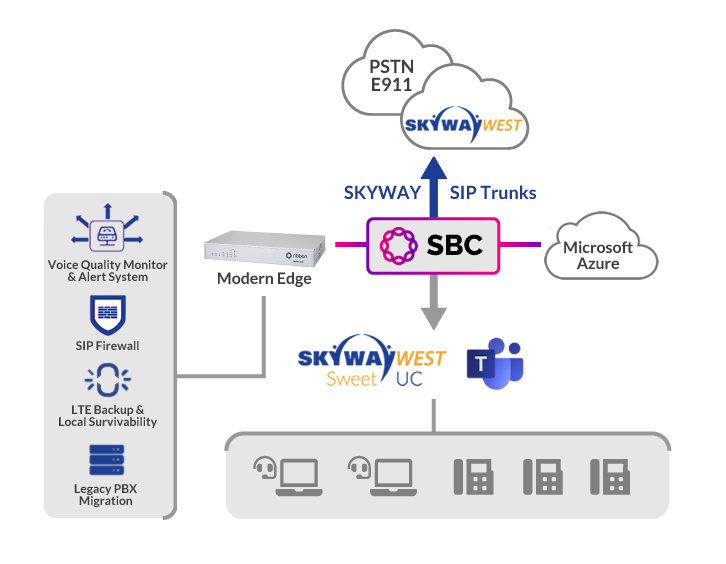
Our Microsoft Certified Direct Routing service allows for easy porting of your phone numbers to Teams, adding Toll-Free and Direct in Dial numbers, and providing unlimited calling across North America. Direct Routing from Skyway West facilitates a seamless shift to full enterprise voice capabilities, overcoming previous limitations of Microsoft Calling Plans.

What is Teams Direct Routing?
Microsoft introduced the concept of “Direct Routing” at Enterprise Connect 2018. This functionality gives service providers like Skyway West the ability to let organizations route calls from their own telephony trunk directly to Teams, through a Microsoft-certified session border controller (SBC). Skyway has built this Direct Routing option into our network, and we give you the opportunity to use Teams as an external phone system while saving you money compared to having to use the Microsoft direct “phone system” Calling Plans model.
Adding Phone Features to Teams
For businesses that take advantage of Microsoft 365, your Teams application can also be a Unified Communications solution completely integrated with your M365 subscription. But to add Telephone System features to your Teams account, you’ll need the following…
- Microsoft 365 subscription that includes Teams for each user
- The addition of the “Phone” sku from Microsoft
- Either the “Calling Plan” sku from Microsoft OR Direct Routing from Skyway West
A Hybrid Solution: How Skyway Direct Routing compares to Microsoft Calling Plan
Let’s be frank. The Microsoft Calling Plan model can be turned on with Microsoft directly. But once you do, you’re pretty well on your own. If you require help setting up features like Auto Attendant, Hunt Groups, etc., then you should strongly consider Skyway’s solution. If ongoing local support is important to you, consider Skyway.
And just like with our internet access solutions, Skyway is well aware that all businesses aren’t exactly the same. Each has unique circumstances and challenges. If your requirements are for everyone in your organization to have the same plan, that’s one thing. But if you’d like to integrate legacy services — Fax or other analog services — or need a tailored, hybrid solution in which some of your staff continue to benefit from your investment in SIP IP phones, then consider Skyway. And best of all? Compared to Microsoft, our pricing is very competitive.
At Skyway, we recognize that each business has its own unique DNA. That’s why we can help tailor our phone solutions to the specific needs of each clients.
Features
Bursting Included
SIP trunks use channel bursting, which means you only pay for phone lines based on your average usage, while still being able to handle increased call volumes during busy times. There are no busy signals and you won’t pay for capacity that you don’t use.
Connect Multiple Locations
Streamline your communication with a single SIP trunk for your entire company that offers multiple SIP channels and DID numbers. This allows for shared dial tone and improved efficiency while reducing costs, all without changing your existing phone numbers.
Fax over SIP
Instead of a separate, expensive legacy phone line just for faxing, send and receive faxes over your Skyway SIP channels. We can also help you connect your analog fax equipment to our SIP trunk service.
Dedicated Internet for Voice
Skyway SIP can utilize your current Internet connection, but for optimal performance, use a dedicated low-latency Fibre or Voice-only DSL connection. Separating Voice traffic from Data improves quality and efficiency, and saves money over traditional voice services.
Benefits
Skyway Helps with Setup
Skyway helps you port your phone numbers and set up features like Auto Attendant, Call Group Queues and Park Zones.
Ongoing Local Support
Skyway provides training and ongoing support of the Teams Phone service.
Integrating Legacy Services
Integrate legacy services like Fax and Analog Overhead Paging with your Teams Phone service.
Integrate Call Centre
Integrate enterprise Call Centre features within your Teams environment.
Keep Your SIP Phones
A true hybrid solution: continue to use SIP IP telephones, allowing you to keep your telephone equipment investment.
Skyway supports Microsoft Certified Devices. Some of our popular devices…

Yealink Phones and Room Systems and Headsets

Poly Video Conferencing, Phones, Speakerphones and Headsets

Jabra Headsets and Meeting Rooms
Connect with Skyway.
Call Sales
604-482-1225
877-771-1077 ext. 2
Set up a meeting
Schedule Now >
Request a callback
Fill out a form, we'll call you >
Looking for Support? Go to Support Centre here.