

DNS Firewall, powered by CIRA, included
We’ve partnered with CIRA (the Canadian Internet Registration Authority) to provide DNS Filtering that protects you from malware and ransomware
How Does DNS Filtering work?
DNS filtering is a cybersecurity tool that uses the Domain Name System to block access to harmful or inappropriate websites. When someone tries to visit a site, their device sends a request to find the site’s IP address. DNS filtering steps in to check this request against a list of blocked or approved domains. If the site is on the blocklist, the request is stopped, keeping the user safe from dangerous content. This process safeguards users from phishing, malware, and other online threats, creating a more secure browsing experience. It also gives organizations the ability to manage what content is accessible on their networks, boosting overall security.
Effective Web Blocking
We catch threats other solutions miss. Our industry-leading threat lists catch threats almost as quickly as they appear. We block millions of botnets and phishing and malware attacks monthly, helping keep our customers safe.
- PDynamic threat feeds produced from global DNS data
- P200,000+ threats added to blocklists daily
- P90% reduction in impacted devices from spearphishing attacks
- P15 minutes to detect and block emerging threats
- PCatch zero-day attacks missed by antivirus software

Protect your users and data
- PHassle-free deployment in just minutes
- PProtects your users, wherever they’re logging in
- PIncreases visibility with intuitive dashboards and reporting
- PDisrupts malware command-and-control
- PTransparent to your end users
- PFast and secure login with SSO
Benefits
Defence based on data science
Leverage advanced malware blocking backed by a global network of servers collecting billions of pieces of data on the latest threats. This data science is used to update threat lists and adds over 100,000 new malicious domains every day, keeping your users and systems safe.
Manage your security profile
Manage your security profile
Enable Google safe search and turn on/off your malware protection at the click of a button. You can also manage content types and mass-block categories like adult content, gambling and other inappropriate content.
Individual sites can be whitelisted or blacklisted as needed.
Customize messages to your users
When a user attempts to visit a malicious site or blocked content, you can display customized messages in their browser to tell them what went wrong and steps to take—such as emailing the threat to your IT security team.
More about DNS Firewall, from the Blog…

How DNS Filtering Protects Your Business from Today’s AI-Driven Cyber Threats
Every business relies on the Domain Name System (DNS) — it’s what translates web addresses (like...
Cyber Threats to Canada’s Democratic Process — 2025 Update
The Communications Security Establishment (CSE) is Canada’s centre of excellence for cyber...
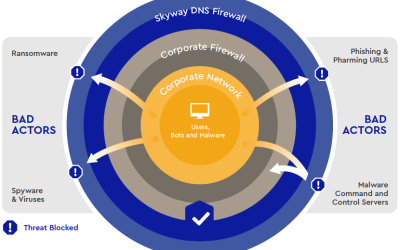
Skyway West Launches Skyway DNS Firewall
Skyway West's DNS Firewall is delivered as a cloud service located in Canadian Internet Exchange...
Connect with Skyway.
Call Sales
604-482-1225
877-771-1077 ext. 2 (Toll Free)
Set up a meeting
Schedule Now >
Request a callback
Fill out a form, we’ll call you >
Looking for Support? Go to Support Centre here.